Search This Blog

Tuesday, February 9, 2016

Using Bulk Rename Utility in a Digital Preservation Workflow

Post by Liz Bedford, Data Services Project Librarian

My first experience getting into the nuts and bolts of digital preservation has been working with the Preservation department here at UW Libraries to remediate digitized versions of rare books for uploading into the HathiTrust Digital Library. Each page gets its own file, so for any book I’m working on, we’re talking about 100-500 TIFFs and JPEGs.  It’s a finicky process, because Hathi has extremely high standards for the material they accept into the collection. Great for future readers! But let’s just say that if it weren’t for automation, there’s no way I’d still be able to type coherently by the end of the day.

One of the tools I’ve come to rely on is Bulk Rename Utility, an open-source file rename utility for Windows. It’s pretty much effortless to set up, has a straightforward and intuitive GUI, and offers a wide variety of ways to play with file names. I predominantly use the Numbering and Extension rename options, but that barely scratches the surface of the functionality.

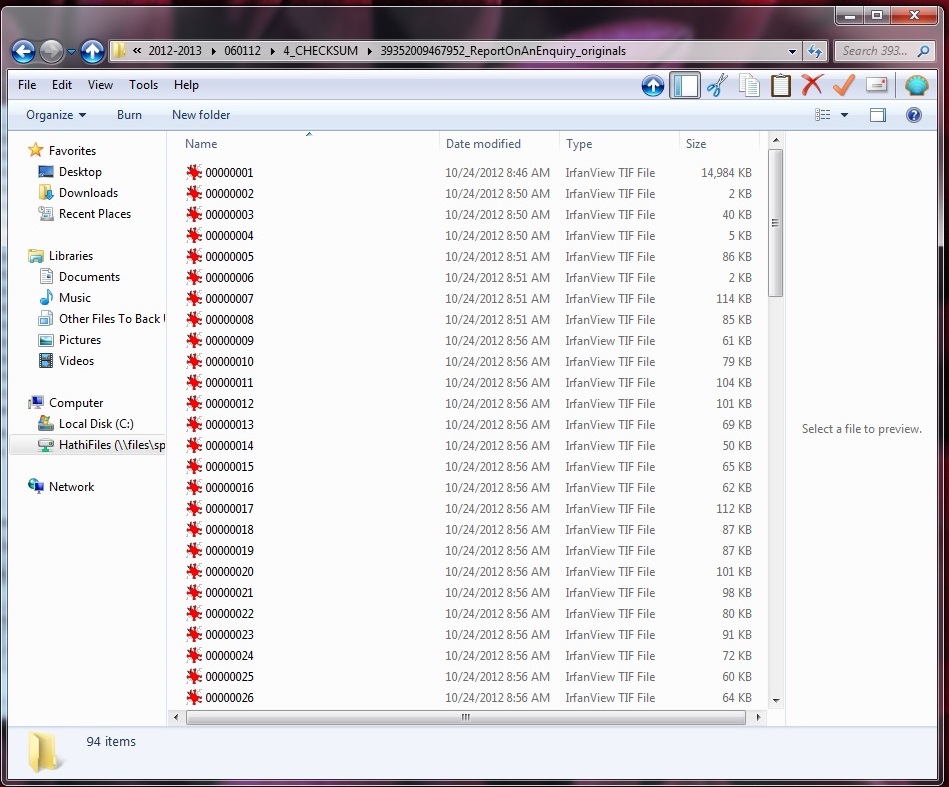
Let’s look at a recent example. A book I was working on was comprised of what I knew to be well-formed TIFFs. But I was unable to open the files, because at some point the file extension was changed from .tif to .tif_original. After opening Bulk Rename Utility, I navigated to my folder using the left sidebar. The first column shows the current file name, while the second shows what the new name will be with the options you’ve selected below. After using Ctrl + Shift to highlight all of my files, I used the dropdown menu in the Extension option (number 11) to indicate that I wanted my extensions to be “Fixed” as tif.
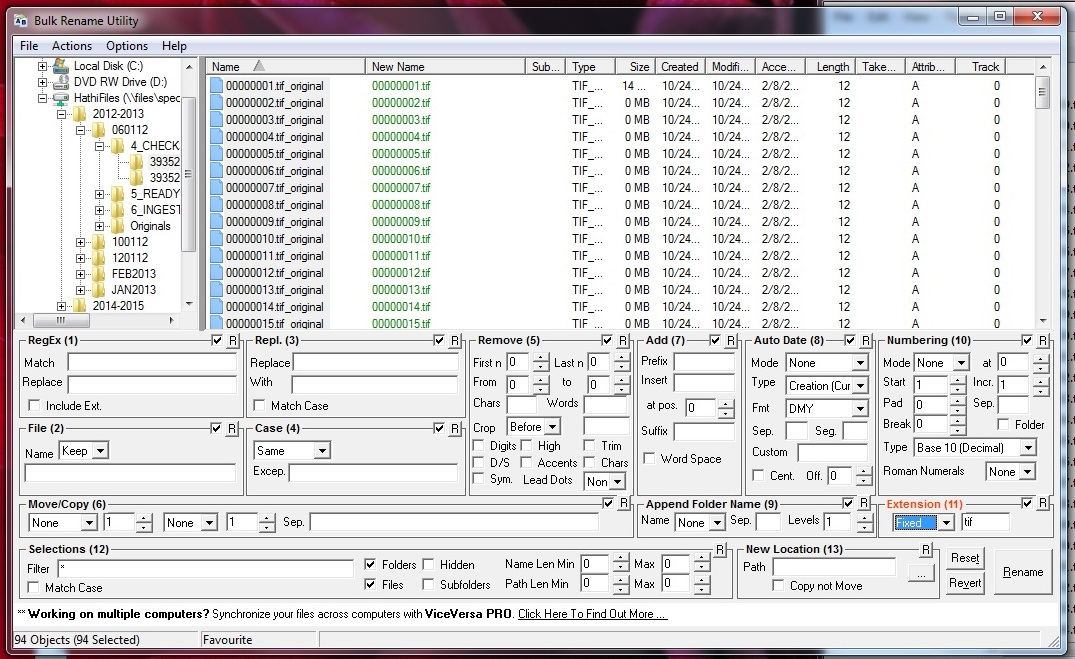
fixed_extension.jpg

After hitting ‘Rename,’ Bulk Rename Utility flashes an ‘are you sure’ warning, which, based on experience, I do appreciate:
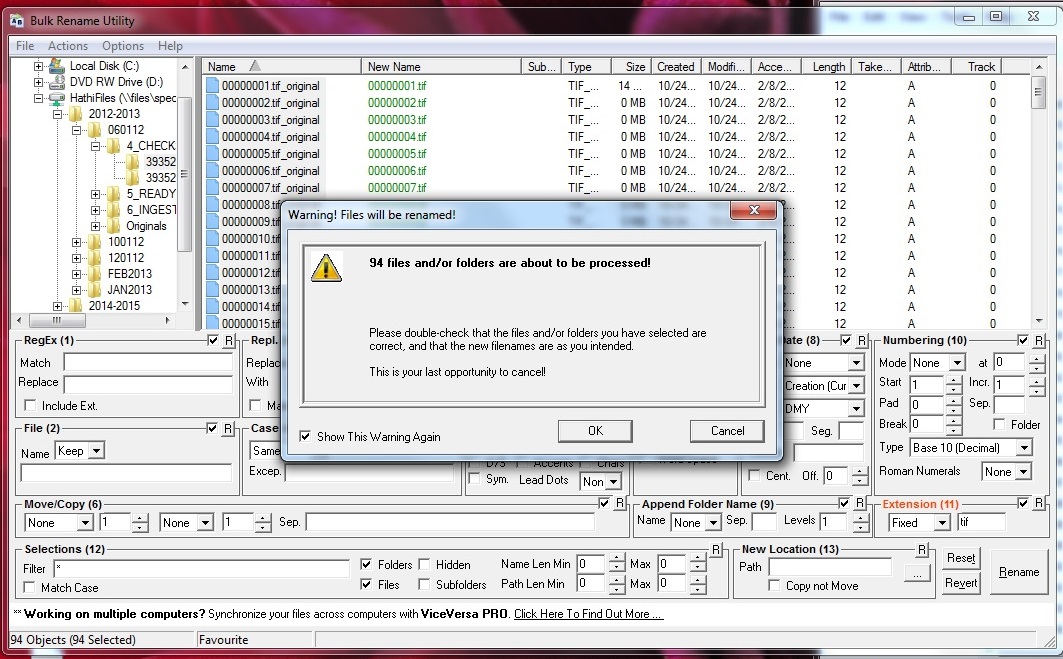
warning.jpg

Three seconds later, my TIFFs are TIFFs, and all is right with the world. (Aka Windows will now let me continue to do my job.)
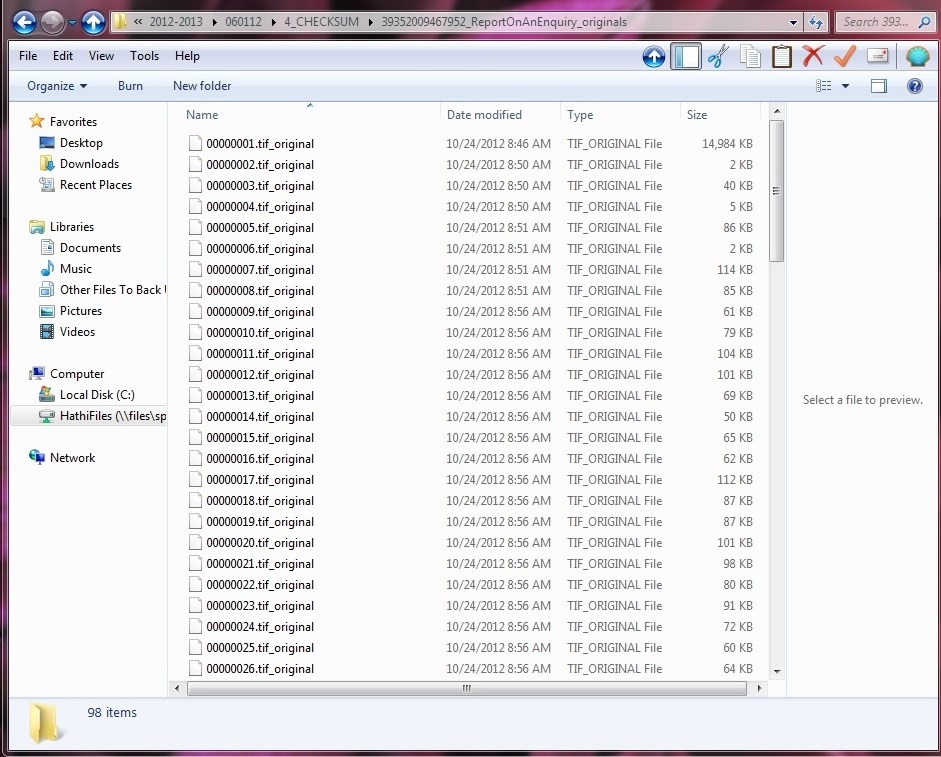
tif_original.jpgvsirfan.jpg

As I said, I’ve also used Bulk Rename Utility to re-number my files in a similarly easy process. I’m sure I’ll find other applications for the software  - I’m particularly curious about the functionality that lets you insert new names from an imported text file - but for now, I’m thrilled it’s on my digital preservation toolbelt.

Love Your Data Week, Day 2: Data Organization

phd101212s_finaldocToday the focus of Love Your Data Week is data organization. We'll have two posts today, the first on the topic of naming, the second reviewing Bulk Rename Utility.

So, first: Data librarians at Penn State have written two blog posts on The Art of Naming Things, one of which focuses on the practice of creating logical element names in a dataset and functions in your code (among other things). The second post deals with naming schemes for files and directories.

Part of #LYD16 is a daily activity designed to both illustrate the concepts being discussed, and to give data users a place to start. Today's activity is to come up with a folder structure and/or naming plan. Tips from #LYD16 folks are:

If you don’t already have a folder structure and/or file naming plan, come up with one and share it. Some good practices for naming files are described below:

  • Be Clear, Concise, Consistent, and Correct
  • Make it meaningful (to you and anyone else who is working on the project) 
  • Provide context so it will still be a unique file and people will be able to recognize what it is if moved to another location.
  • For sequential numbering, use leading zeros.
    • For example, a sequence of 1-10 should be numbered 01-10; a sequence of 1-100 should be numbered 001-010-100.
  • Do not use special characters: & , * % # ; * ( ) ! @$ ^ ~ ‘ { } [ ] ? < >
    • Some people like to use a dash ( – ) to separate words
    • Others like to separate words by capitalizing the first letter of each (e.g., DST_FileNamingScheme_20151216)
  • Dates should be formatted like this: YYYYMMDD (e.g., 20150209)
    • Put dates at the beginning or the end of your files, not in the middle, to make it easy to sort files by name
    • OK: DST_FileNamingScheme_20151216
    • OK: 20151216_DST_FileNamingScheme
    • AVOID: DST_20151216_FileNamingScheme
  • Use only one period and before the file extension (e.g., name_paper.doc NOT name.paper.doc OR name_paper..doc)

There are generally two approaches to folder structures. Filing, or using a hierarchical folder structure. The other approach is piling, which relies on fewer folders and uses the search, sort, and tagging functions of your operating system or cloud storage tools like Box.
DSP_FolderStructure-Ex2DSP_FolderStructure-Ex1

Monday, February 8, 2016

Love Your Data Week, Day 1: Keep Your Data Safe

Welcome to Day 1 of Love Your Data Week! We're going to kick off the week by talking about the 3-2-1 rule:
  • Keep 3 copies of any important file (1 primary, 2 backup copies)
  • Store files on at least 2 different media types (e.g., 1 copy on an internal hard drive and a second in a secure cloud account or an external hard drive)
  • Keep at least 1 copy offsite (i.e., not at your home or in the campus lab)
Things to Avoid: 
  • Storing the only copy of your data on your laptop or flash drive
  • Storing critical data on an unencrypted laptop or flash drive
  • Saving copies of your files haphazardly across 3 or 4 places
  • Sharing the password to your laptop or cloud storage account

TODAY’S ACTIVITY

Data snapshots or data locks are great for tracking your data from collection through analysis and write up. Librarians call this provenance, and it can be really important. Errors are inevitable. Data snapshots can save you lots of time when you make a mistake in cleaning or coding your data. Taking periodic snapshots of your data, especially before the next phase begins (collection or processing or analysis) can keep you from losing crucial data and time if you need to make corrections. These snapshots then get archived somewhere safe (not where you store active files) just in case you need them. If something should go wrong, copy the files you need back to your active storage location, keeping the original snapshot in your archival location. For a 5-year longitudinal study, you might take snapshots every quarter. If you will be collecting all the data for your study in a 2-week period, you will want to take snapshots more often, probably every day. How much data can you afford to lose? Oh, and (almost) always keep the raw data! The only time when you might not is it’s easier and less expensive to recreate the data than keep it around.
Instructions: Draw a quick workflow diagram of the data lifecycle for your project (check out our examples on Instagram and Pinterest). Think about when major data transformations happen in your workflow. Taking a snapshot of your data just before and after the transformation can save you from heartache and confusion if something goes wrong.

TELL US 

Where do you store your data? Why did you choose those platform(s), locations, or devices?
Twitter: #LYD16 or @IandPangurBan
Instagram: #LYD16
Facebook: #LYD16

RESOURCES

Check out the resource board & the changing face of data on Pinterest, or email the UW Libraries Data Services Team with questions.

Thursday, February 4, 2016

Love Your Data week, 8-12 February 2016

Next week, the University of Washington Libraries will be participating in Love Your Data, a nationwide event designed to raise awareness about research data management, sharing, and preservation, along with the support and resources available at our university. For five days, Feb. 8 - 12, we will share related tips and tricks, stories (both success and horror!), resources, and point you to local experts. In return, we ask that you share your own experiences and results from the daily activities to keep the conversation lively. You can also follow the national conversation on Twitter, Instagram and Facebook via #LYD16

In the meantime, check our NPR's "Will Future Historians Consider These Days The Digital Dark Ages?" and Raiders of the Lost Web from the Atlantic for a glimpse into the implications of data loss.


Tuesday, February 2, 2016

Announcing the 2016 eScience Data Science for Social Good summer program

DSSG_logo.png
The University of Washington eScience Institute, in collaboration with Urban@UW and Microsoft, is excited to announce the 2016 Data Science for Social Good (DSSG) summer program. The program brings together data and domain scientists to work on focused, collaborative projects that are designed to impact public policy for social benefit.

Modeled after similar programs at the University of Chicago and Georgia Tech, with elements from our own Data Science Incubator, sixteen DSSG Student Fellows will be selected to work with academic researchers, data scientists, and public stakeholder groups on data-intensive research projects. Graduate students and advanced undergraduates are eligible for these paid positions.

This year’s projects will focus on Urban Science, aiming to understand and extract valuable, actionable information out of data from urban environments across topic areas including public health, sustainable urban planning, crime prevention, education, transportation, and social justice.

For more program details and application information visit:

Wednesday, January 20, 2016

UW Data Science Poster and Networking Session - Register now!


Are you engaged in research or teaching involving data-intensive discovery — either advancing the methodologies, or putting these methodologies to work in any field of discovery?  Does your work require extracting knowledge from large, noisy, or complex datasets? Do you use advanced statistical techniques, advanced data management platforms, or advanced visualization methods in your work? Are you involved in inventing these advanced methods? If so, please register to present your work in this poster session!

This two-hour event is an opportunity for the University of Washington campus community and regional partners to present their activities and connect with others engaged in data-intensive discovery.

Date: Feb 10, 2016 | 3:00 pm – 5:00 pm

Location: Mary Gates Commons

Refreshments will be provided for all attendees … the costs of poster production will be covered … easels will be provided … how can you say no?

This is an incomparable opportunity to network with others who are advancing the forefront of data-intensive discovery.
  • Posters must be roughly 32″ x 40″
  • Posters must be mounted on posterboard or foamcore (easels will be provided for displaying them – they will not be tacked to the wall)
  • You must be present at the poster session (although you’re encouraged to bring someone along so you can simultaneously staff your poster and network with others)
  • You must register by Wednesday February 3
Various off-campus printshops (e.g., FedEx) can assist, as well as UW Creative Communications, UW Posters (in the Health Sciences), and (for their members) many major departments. Save your receipts – we’ll reimburse your expenses up to $100!

Please register here by Wednesday February 3rd to present a poster!
We’ll see you on February 10 at 3:00pm (setup beginning at 1:00pm) in the Mary Gates Commons!

Questions? Contact manager@escience.washington.edu

Wednesday, January 13, 2016

Just in time for Valentine's Day: Love Your Data Week!

The University of Washington Libraries will be participating in Love Your Data week, a nationwide event designed to raise awareness about research data management, sharing, and preservation, along with the support and resources available at our university. We believe research data are the foundation of the scholarly record and crucial for advancing knowledge of the world around us. Visit this blog during the week of February 8, 2016: each day will we will share daily tips and tricks for managing research data, stories (both success and horror!), examples and resources. 

You can also join the national conversation on Twitter via #LYD16. The main site for Love Your Data Week will also be a good source of information for the week, and you can see other participating institutions listed there as well.